
Review and Fix a Draft Invoice in Needs Review
Check a draft invoice section by section, fix what duebird flagged, then approve it or cancel it.
2 min readUpdated
A draft invoice is fully editable. duebird flags problems in the header, for example "tax unknown on 1 line".
A live preview on the right shows the invoice as the customer will see it, with a DRAFT watermark.
How It Works
The draft's header shows Draft, Approve, Preview (P), the total and the due date. The more menu holds Cancel invoice.
Nothing is owed on a draft. Its Payments tab reads "Nothing is owed until the invoice is approved and issued."
Open the Draft
- Click Invoices in the sidebar.
- Set Status to Draft, or open an invoice marked Needs review.
- Read any flag next to the header, for example "tax unknown on 1 line".
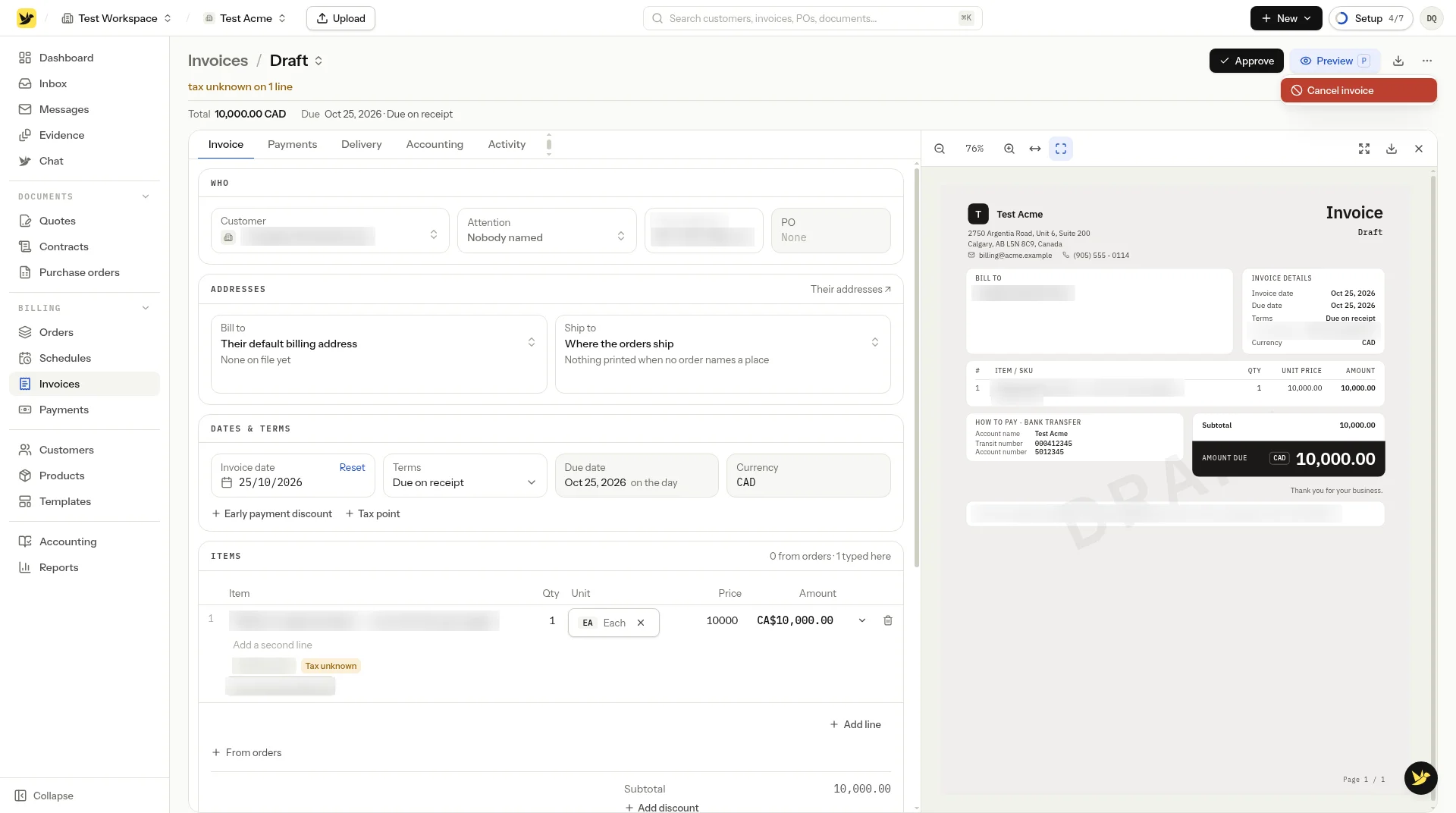
Check Each Section
- WHO: Customer, Attention ("Nobody named" if empty), Their reference and PO.
- ADDRESSES: Bill to ("Their default billing address") and Ship to ("Where the orders ship"), with Their addresses beside them.
- DATES & TERMS: Invoice date (with Reset), Terms, Due date and Currency. Add + Early payment discount or + Tax point if needed.
- ITEMS: each line's Item, Qty, Unit, Price and Amount. A line marked Tax unknown needs a tax category on its product.
- HOW THEY PAY and WORDS: the payment methods printed on the invoice, and a Note to the customer, "Printed under the totals".
Fix Common Flags
- Tax unknown: the line's product has no tax category. See Fix Tax Unknown on an Invoice Line.
- No payment method: "No payment method for CAD - the invoice prints none." Add one in Settings > Payments.
- Wrong line: edit it, remove it, or add a line with + Add line or + From orders.
Approve or Cancel
- Click Approve when the draft is right.
- To drop a draft you do not need, open the more menu and choose Cancel invoice.
Tips
- Fix every flag before you approve. An issued invoice can only be corrected with a credit note.
- Use Preview (P) to read the invoice full size.
- Add the customer's PO number under WHO if they need it to pay.
Frequently Asked Questions
Can I edit a draft after duebird made it?
Yes. Every section of a draft is editable until it is approved.
What does tax unknown mean?
A line's product has no tax category, so duebird cannot work out its tax.
How do I get rid of a duplicate draft?
Open the more menu and choose Cancel invoice.