
Fix Tax Unknown on an Invoice Line
When a draft invoice line says Tax unknown, find the cause and fix it. The draft updates itself.
1 min readUpdated
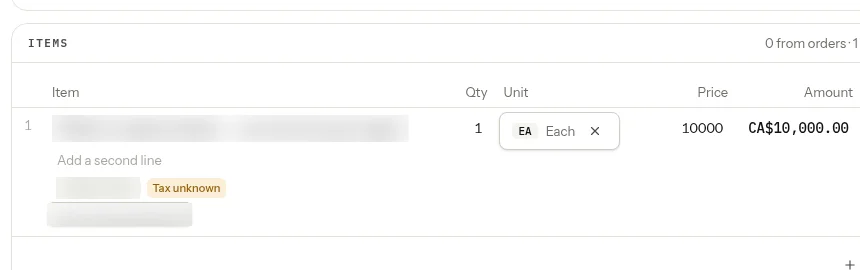
Tax unknown on a line means duebird could not work out the tax for it.
The draft waits in Needs review with a flag such as "tax unknown on 1 line" until it is fixed.
How It Works
Every line takes its tax category from its product. "A registered organization's invoices wait on a product with none."
duebird flags the draft, and the line shows Tax unknown under ITEMS, when:
- The line's product has no tax category.
- The customer has no address to tax by, or the address cannot be placed in a tax jurisdiction.
- Your ship-from location is missing.
When you fix a product's tax category, duebird re-taxes its draft invoices automatically. Issued invoices are locked and do not change.
Fix the Line
- Open the draft invoice from Invoices. The flag shows what needs fixing.
- Under ITEMS, find the line marked Tax unknown.
- If the product has no category, open it from Products. Under TAX, click Change and choose one.
- Otherwise, check the customer's address on their Details, and your ship-from in Settings > Tax > Locations.
- Return to the draft. It is re-taxed automatically.
Tips
- Set the tax category when you create a product, so lines never wait.
- Set a Default category in Settings > Tax for lines without one.
- Check the Products list's Tax category column for gaps.
Frequently Asked Questions
Why is my invoice stuck in Needs review?
A line may say Tax unknown. Fix the product's tax category.
Can a default category cover lines without one?
Yes. The Default category applies "when neither it nor its product names one".
Will fixing the product fix other drafts too?
Yes. duebird re-taxes every draft using that product. Issued invoices do not change.