
Track Sales Against Registration Thresholds
See how close your sales in each place are to the point where you must register there.
1 min readUpdated
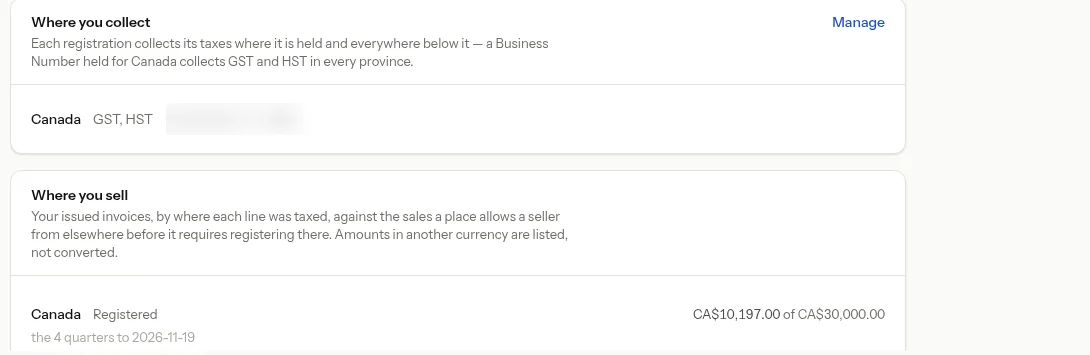
Where you sell shows your issued invoices by place, against the sales each place allows from a seller elsewhere before it requires registering there.
How It Works
Where you sell is on Settings > Tax > Overview. It lists "Your issued invoices, by where each line was taxed, against the sales a place allows a seller from elsewhere before it requires registering there."
Each place shows whether you are registered and your sales against its threshold, over that place's own lookback period, such as the last 4 quarters. Thresholds come from duebird's built-in tax reference. duebird alerts you when your sales reach 80% of a threshold.
"Amounts in another currency are listed, not converted."
The Tax collected report links to the same view, under To check: "Where you sell, against each place's threshold".
Check Your Thresholds
- Open your organization's settings and click Tax.
- Scroll to Where you sell.
- For each place, compare your sales with the threshold.
Tips
- Check Where you sell every quarter.
- Talk to your tax adviser as a place gets close to its threshold.
- Add a registration in Settings > Tax once you register in a new place.
Frequently Asked Questions
Which sales count toward a threshold?
Your issued invoices, by where each line was taxed.
What period does it cover?
Each place's own lookback period, shown under the place, such as the last 4 quarters.
Will duebird warn me before I reach a threshold?
Yes. It alerts you at 80% of a place's threshold.
Are sales in other currencies converted?
No. "Amounts in another currency are listed, not converted."