
How duebird Calculates Tax on Invoices
duebird works out the tax on each line from where you are registered, where the customer is, and what you sell.
2 min readUpdated
With tax Calculated by duebird, you do not pick rates line by line.
duebird uses the tax rules it keeps for each country and state or province, against where you are registered and where each customer is.
How It Works
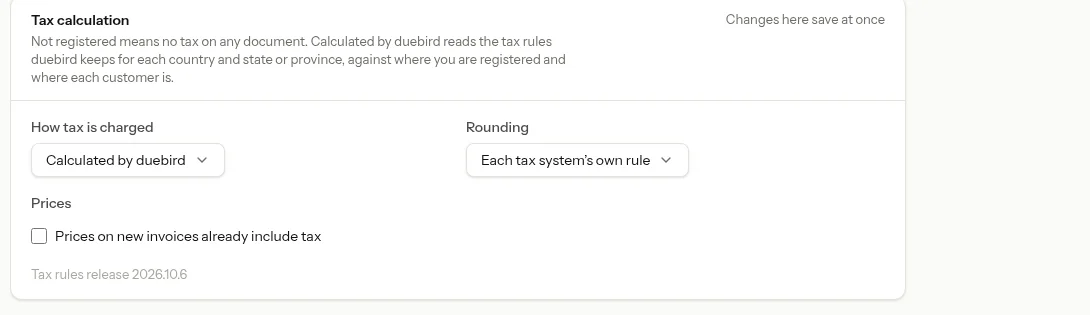
Under Tax calculation on Settings > Tax > Overview:
- How tax is charged: Calculated by duebird. duebird "reads the tax rules duebird keeps for each country and state or province, against where you are registered and where each customer is."
- Rounding: "Each tax system's own rule".
- Prices: "Prices on new invoices already include tax", a checkbox you turn on if your prices are tax-inclusive.
- Tax rules release: the version of the rules in use.
Each line's tax category comes from its product. When neither the line nor its product names one, the Default category applies. Delivery charges take the Shipping and delivery category.
A customer's tax treatment, set under Who they are, for tax, changes what they pay only where the law treats them differently.
Where a line is taxed depends on what is sold:
- Goods: where they are shipped to.
- Services done on site: the site address.
- Services done remotely: where the customer is, from their billing address.
Check How Tax Is Charged
- Open your organization's settings and click Tax.
- Under Tax calculation, check How tax is charged and Rounding.
- Tick Prices on new invoices already include tax only if your prices include tax.
Tips
- Set a tax category on every product so each line is taxed the right way.
- Keep customer billing and shipping addresses complete. They decide where a line is taxed.
- Check Tax collected under Reports for documents with a tax set by hand.
Frequently Asked Questions
Do I choose the tax rate on each line?
No. duebird works it out from the product's tax category, your registrations and where the customer is.
Can my prices include tax?
Yes. Tick Prices on new invoices already include tax.
How is tax rounded?
By each tax system's own rule.