
Correct an Issued Invoice With a Credit Note
Credit a price, a return or an allowance on an issued invoice, or give a standalone credit.
2 min readUpdated
"When an issued invoice is wrong (a price, a return, an allowance) credit it rather than cancelling it. The invoice keeps its number and the correction keeps its own."
A credit note is numbered when it is approved.
How It Works
You can start a credit note from:
- An issued invoice: More invoice actions > Credit this invoice or Credit in full.
- Invoices > Credit notes > New credit note.
- + New > Credit note, "Correct an issued invoice".
When a credit note is approved, it gets its number and becomes credit the customer can use. It is not emailed to the customer automatically. The invoice's balance drops when the credit is applied to it.
The Credit notes tab lists credit notes. Search by number, customer, invoice or reason, or filter by Status.
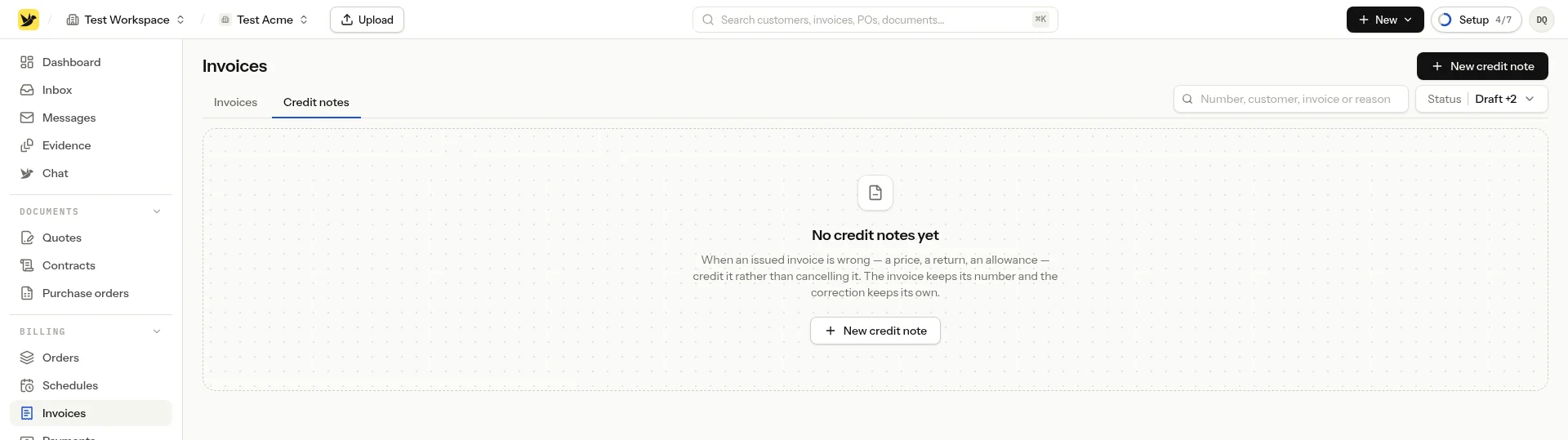
Credit an Invoice
- Open the issued invoice and click the more menu.
- Choose Credit this invoice to credit part of it, or Credit in full when the whole invoice was wrong.
- Check the credit note and send it for approval.
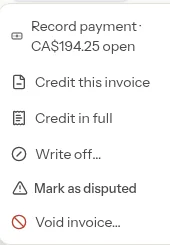
Apply the Credit
Once approved, apply the credit to the invoice from its Payments tab, under CREDITS. The invoice's balance drops by the amount applied.
Tips
- Credit, do not cancel, an issued invoice. Both documents keep their own numbers.
- Use Credit in full when the whole invoice was wrong.
- Send the customer the credit note yourself once it is approved.
Frequently Asked Questions
When does a credit note get its number?
When it is approved.
Is the credit note emailed to the customer?
Not automatically. Send it yourself.
Does the original invoice change?
No. "The invoice keeps its number and the correction keeps its own." Its balance drops when the credit is applied.