
Write Off, Dispute or Void an Invoice
Stop counting a balance you will not collect, flag an invoice the customer disputes, or cancel one raised in error.
2 min readUpdated
An issued invoice's more menu has Write off..., Mark as disputed and Void invoice....
Each does something different. Pick carefully, because a void cannot be undone.
How It Works
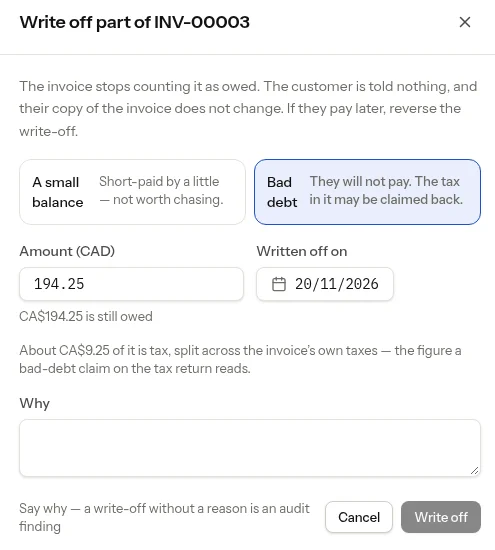
- Write off: "The invoice stops counting it as owed. The customer is told nothing, and their copy of the invoice does not change. If they pay later, reverse the write-off."
- Mark as disputed: an internal flag. The balance is still owed, but duebird stops chasing it and does not apply payments to it automatically while it is disputed.
- Void invoice: cancels an invoice raised in error. The invoice is stamped VOID. This cannot be reversed, and its number is never reused.
To correct an amount on a valid invoice, use a credit note instead. See Correct an Issued Invoice With a Credit Note.
Write Off a Balance
- Open the invoice and click the more menu, then Write off....
- Choose why: A small balance ("Short-paid by a little: not worth chasing") or Bad debt ("They will not pay. The tax in it may be claimed back.").
- Check the Amount and the Written off on date. The dialog shows how much of the amount is tax.
- Under Why, say why. "A write-off without a reason is an audit finding."
- Click Write off.
Mark an Invoice as Disputed
- Open the invoice and click the more menu.
- Choose Mark as disputed.
Void an Invoice
- Open the invoice and click the more menu.
- Choose Void invoice... only for an invoice raised in error.
Tips
- Always give a reason for a write-off.
- Use Mark as disputed while you sort out a disagreement, so the customer is not chased.
- Prefer a credit note to a void when the invoice was valid but wrong.
Frequently Asked Questions
Is the customer told about a write-off?
No. Their copy of the invoice does not change.
Can I undo a write-off?
Yes. If they pay later, reverse the write-off.
Can I undo a void?
No. A void cannot be reversed.