
Invoice Statuses Explained
What each invoice status means, from draft to paid, and how to filter the Invoices list.
2 min readUpdated
Every invoice starts as a draft and must be approved before it is issued. Invoice: "A draft, sent after approval".
Once issued, an invoice is numbered and locked: "It can no longer be changed: correct it with a credit note."
How It Works
An invoice moves through these stages:
- Needs review: an editable draft. duebird flags problems, such as "tax unknown on 1 line". Its Payments tab reads "Nothing is owed until the invoice is approved and issued."
- Awaiting approval: submitted for approval. The Dashboard shows the total under Awaiting approval.
- Approved: approved and ready to issue.
- Issued: numbered and locked.
- Sent: delivered to the customer. The Delivery tab shows who received it and when.
- Paid or Cancelled: settled in full, or cancelled.
An issued invoice can also be written off, marked as disputed or voided. See Write Off, Dispute or Void an Invoice.
The invoice's Activity tab records each step under VERSIONS and WHAT HAPPENED.
Filter the Invoices List
- Click Invoices in the sidebar.
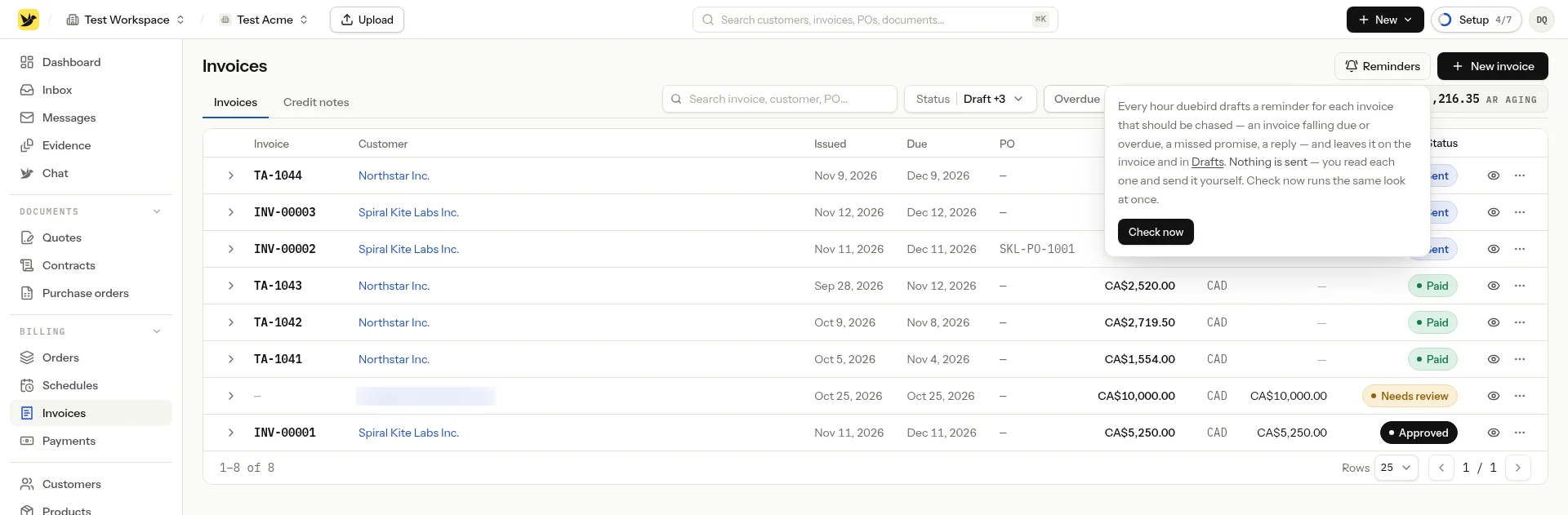
- Open Status and choose Draft, Awaiting approval, Outstanding, Paid or Cancelled.
- Turn on Overdue to see only invoices past their due date, or filter by Customer.
Read the List
Each row shows Invoice, Customer, Issued, Due, PO, Total, Ccy, Balance and Status. Click the eye icon for a quick preview. OUTSTANDING at the top shows the total still owed, with a link to AR AGING.
Tips
- Check Awaiting approval on the Dashboard so invoices do not wait on an approver.
- Use the Overdue toggle with the Customer filter before a collections call.
- Cancel a draft you do not need from its more menu. Issued invoices are corrected with a credit note instead.
Frequently Asked Questions
Can I change an issued invoice?
No. "Issued. It can no longer be changed: correct it with a credit note."
What does Needs review mean?
The invoice is a draft that still needs a person to check it and approve it.
Where do I see the steps an invoice went through?
On its Activity tab, under VERSIONS and WHAT HAPPENED.