
Approve, Issue and Send an Invoice
How an invoice goes from draft to approved, issued and sent, and where each step is recorded.
2 min readUpdated
Invoices are "A draft, sent after approval". A person approves each one, and sending is a separate step.
Approval issues the invoice and prepares its email. Nothing leaves until a person sends it.
How It Works
Who signs off an invoice:
- Settings > Invoices > Approval: the Default approver, "Who signs an invoice that needs approval, when its customer names nobody of their own." It can be Any approver or a named member.
- The customer's billing profile: an Approver, or "Organization default".
Org admins, billing managers and approvers can approve invoices.
When you approve, the invoice is issued straight away if its invoice date is today or earlier. A future-dated invoice waits and is issued that morning.
Approval also prepares the invoice email as a draft. By default it goes to the customer's contacts with a billing role (Billing, Accounts payable or Invoice recipient), plus whoever sent the document being billed.
Once issued, an invoice is numbered and locked. Correct it with a credit note.
Approve the Draft
- Open the draft from Invoices and fix anything duebird flagged. See Review and Fix a Draft Invoice in Needs Review.
- Click Approve in the header.
- Invoices waiting on an approver show as Awaiting approval.
Send the Invoice
- Open the approved invoice.
- Check the email, its recipients and what is attached.
- Send it. The invoice's status changes to Sent.
Follow the Steps on the Activity Tab
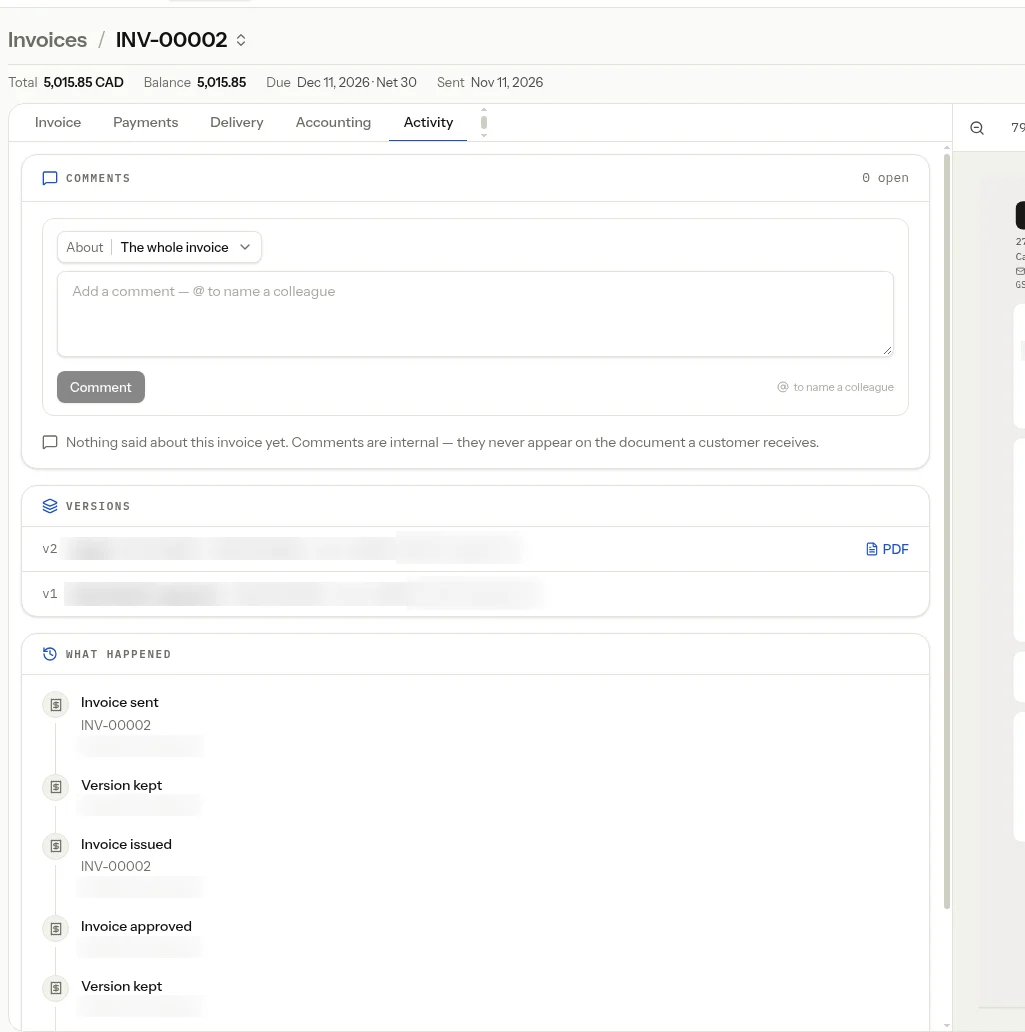
- Open the invoice and click Activity.
- Under VERSIONS, read each kept version, such as "Submitted for approval" and "Issued", with a PDF of that version.
- Under WHAT HAPPENED, read the events in order, such as Invoice approved, Invoice issued and Invoice sent.
Tips
- Set a Default approver so no invoice waits without one.
- Tag the customer's billing contacts so the email reaches the right people.
- Download the PDF of a version from VERSIONS when you need the exact copy that was issued.
Frequently Asked Questions
Does approving an invoice email it to the customer?
No. Approval prepares the email. A person sends it.
Who can approve invoices?
Org admins, billing managers and approvers.
Can I change an invoice after it is issued?
No. Correct it with a credit note.