
Record a Contract the Customer Signed Elsewhere
Add a contract, or a signed change to one, that your customer signed outside Duebird, and check what duebird read from it.
2 min readUpdated
Contracts signed outside Duebird can be recorded from the customer's signed copy. duebird reads them like any other document and links each rule to the clause it came from.
For a contract you already have, Record one they sent... records a signed amendment, extension, restatement or termination.
How It Works
There are two cases:
- A whole contract: on the customer's Agreements, click Record a signed one, or upload the signed copy with Upload in the top bar.
- A signed change to a contract: on the contract's Details tab, click Record one they sent....
A recorded contract shows "Recorded" and the date under its number on the Contracts list, and its DOCUMENTS read "Original agreement · Signed · Recorded from the customer's copy".
Record a Whole Contract
- Open the customer and go to Agreements. Under CONTRACTS, click Record a signed one.
- Or click Upload in the top bar and drop the signed copy. duebird reads it and asks about anything it cannot settle. See Answer duebird's Questions.
Record a Signed Change
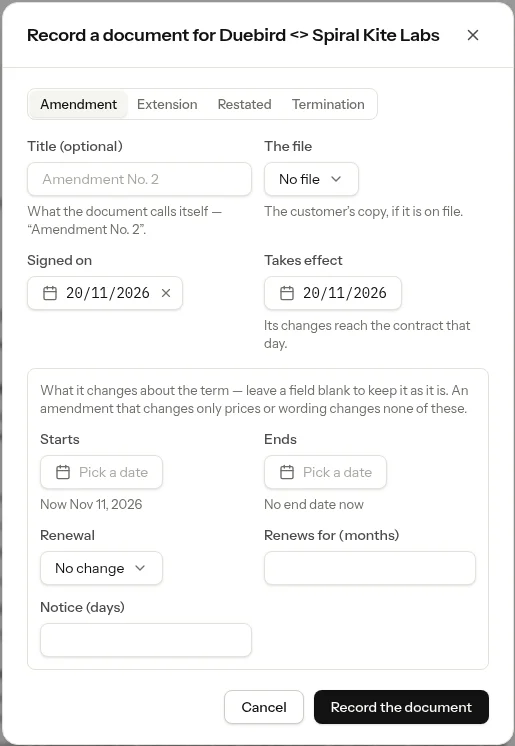
- Open the contract from Contracts. At the bottom of the Details tab, click Record one they sent....
- Choose the kind: Amendment, Extension, Restated or Termination.
- Add a Title (optional), "What the document calls itself", and choose The file, "The customer's copy, if it is on file".
- Set Signed on and Takes effect. "Its changes reach the contract that day."
- Fill in Starts, Ends, Renewal, Renews for (months) or Notice (days) only if the document changes them. Leave the rest blank.
- Click Record the document.
Check What duebird Read
- Open the contract from Contracts. The original is on the left, with Original and Text tabs and page navigation.
- On Details, check In force, Renewal and Rules, for example "Renews for 12 months unless 60 days' notice is given".
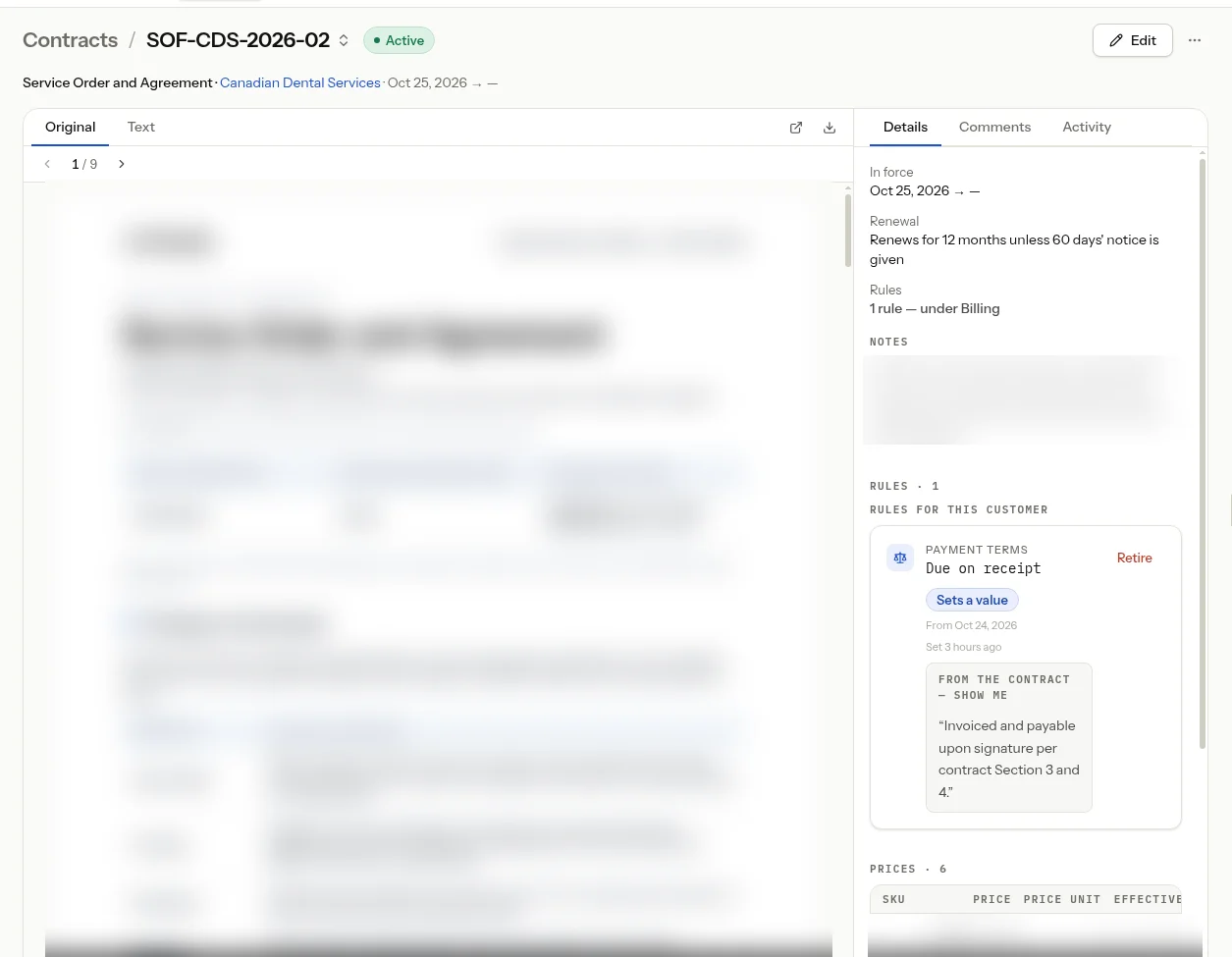
- Under RULES FOR THIS CUSTOMER, read FROM THE CONTRACT · SHOW ME to see the clause each rule came from.
- Check NOTES and PRICES. Each price is Active or Superseded.
- If a rule is wrong, click Retire.
Tips
- Always compare a rule with its quoted clause before you rely on it.
- Superseded prices stay on the contract, so you can see what a price used to be.
- Use the Activity tab, filtered to Edits, to see changes made after recording.
Frequently Asked Questions
How do I check where a rule came from?
Open the rule's FROM THE CONTRACT · SHOW ME. It quotes the clause.
The customer signed an amendment on paper. How do I add it?
Open the contract and click Record one they sent... on the Details tab, then choose Amendment.
Does a recorded contract go through e-signature?
No. It is recorded from the customer's signed copy, and DOCUMENTS says so.