
Read the Dashboard: Needs You, Money, Accounts and From duebird
What each Dashboard tile means, where it takes you, and how to read the From duebird line.
2 min readUpdated
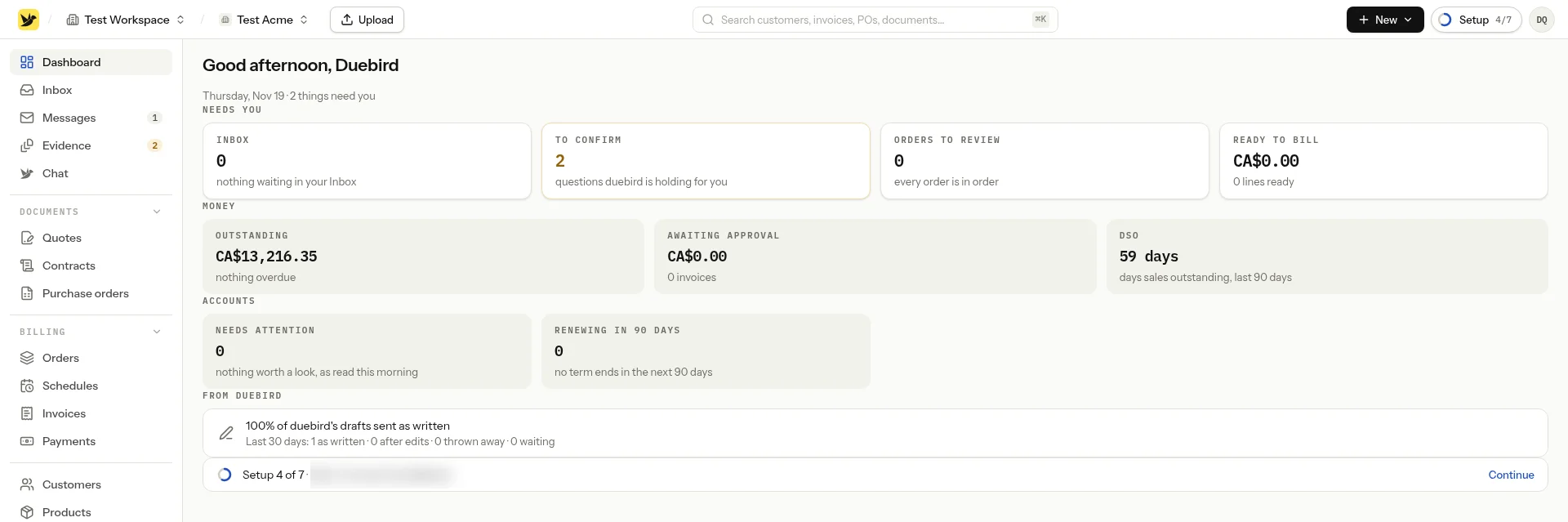
The Dashboard is your daily view of what needs attention. It greets you, shows the date and how many things need you, for example "2 things need you".
Every tile opens the matching filtered list.
How It Works
The Dashboard is the first item in the sidebar. The duebird logo in the top left also brings you back here. Tiles are grouped into NEEDS YOU, MONEY and ACCOUNTS, followed by FROM DUEBIRD and, until setup is finished, a setup strip.
Read Each Tile
- Inbox (NEEDS YOU): items waiting in your Inbox. Opens Inbox.
- To confirm (NEEDS YOU): "questions duebird is holding for you". Opens Evidence, waiting.
- Orders to review (NEEDS YOU): orders that need a look ("every order is in order" when none). Opens Orders, Needs review.
- Ready to bill (NEEDS YOU): the amount and number of lines ready to invoice. Opens Orders, Ready to bill.
- Outstanding (MONEY): total outstanding, and whether any of it is overdue. Opens Invoices, overdue.
- Awaiting approval (MONEY): value and count of invoices waiting for approval. Opens Invoices, Awaiting approval.
- DSO (MONEY): "days sales outstanding, last 90 days". Opens the AR Aging report.
- Needs attention (ACCOUNTS): accounts worth a look, "as read this morning". Opens Customers, Needs attention.
- Renewing in 90 days (ACCOUNTS): contract terms ending in the next 90 days. Opens Customers, Renewing.
Read From duebird
FROM DUEBIRD shows two kinds of item:
- Documents or conversations duebird stopped to ask about, each with an Answer button. See Answer duebird's Questions.
- A line on how often duebird's drafts go out unchanged, for example "100% of duebird's drafts sent as written" with "Last 30 days: 1 as written · 0 after edits · 0 thrown away · 0 waiting".
The counts mean:
- As written: drafts someone reviewed and sent without changes.
- After edits: drafts sent after someone changed the subject, body or recipients.
- Thrown away: drafts someone discarded.
- Waiting: drafts in Drafts, waiting for review.
Use the Setup Strip
Until setup is finished, a strip at the bottom shows your progress, for example "Setup 4 of 7", the next step and Continue. You can hide it from the Setup guide.
Tips
- Work from left to right: clear NEEDS YOU first, then check MONEY for anything awaiting approval or overdue.
- Click any tile to jump straight to the filtered list behind it.
- DSO opens the AR Aging report, so you can see which balances are behind the number.
Frequently Asked Questions
What does "drafts sent as written" measure?
How many of duebird's drafts were reviewed and sent without changes in the last 30 days.
Where do the To confirm questions go when I click the tile?
To Evidence, filtered to documents waiting on you.