
Where to Start in Your Role
The roles in Duebird, what each one can do, and the first screens to open in each.
2 min readUpdated
Each person has a role in each organization they can reach. The role decides what they can do.
Admins choose roles when they invite people, in Settings > Members > Invite people. "A role changes the moment you pick it."
How It Works
Not sure of your role? Ask an admin on your team. Workspace owners and Workspace admins are "Org admin everywhere".
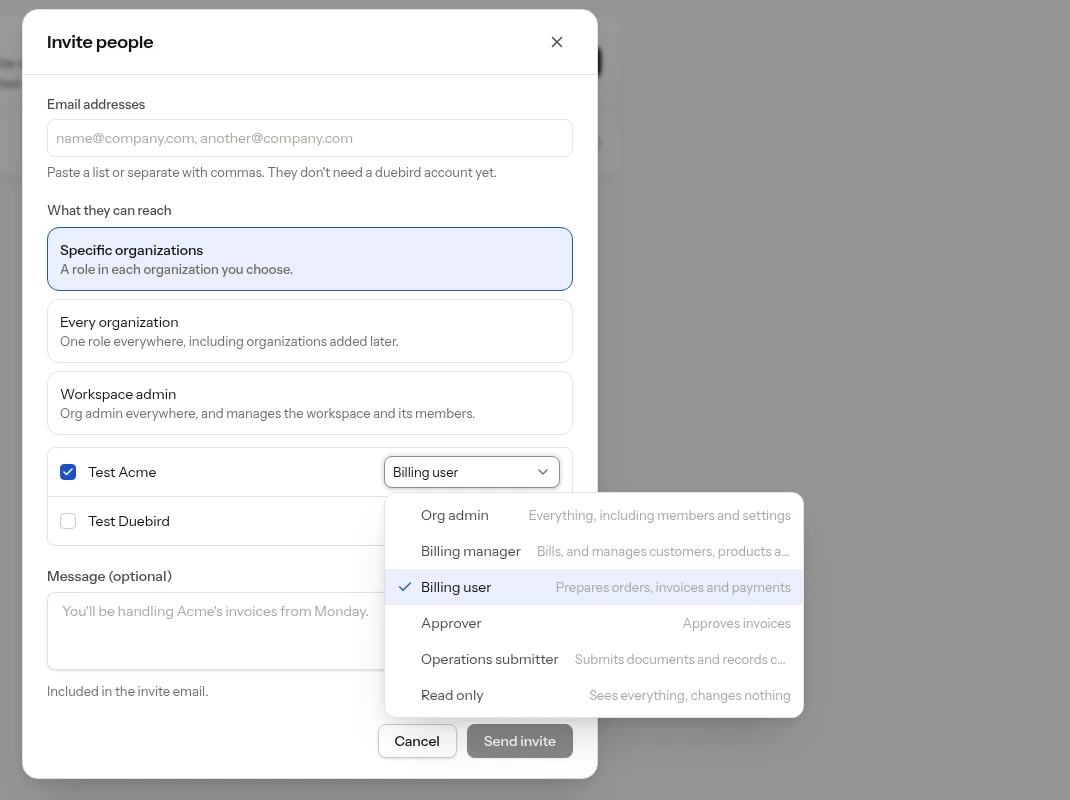
Org Admin
"Everything, including members and settings." Start in Settings > Setup guide, then Members to invite your team. Set a default approver in Settings > Invoices.
Billing Manager
"Bills, and manages customers, products and terms." Start on the Dashboard at NEEDS YOU, then Customers and Products.
Billing User
"Prepares orders, invoices and payments." Start in Orders at Ready to bill, then Invoices in Needs review, then Payments.
Approver
"Approves invoices." Start on the Dashboard at Awaiting approval, which opens the invoices waiting for you.
Operations Submitter
"Submits documents and records completed work." Start with Upload in the top bar, and completions on orders.
Read Only
"Sees everything, changes nothing." Start with the Dashboard and Reports.
Account Managers
Account managers are set per customer, not as a role. If you own accounts, start with Customers, then the Needs attention and Renewing views. The Dashboard ACCOUNTS tiles open the same lists.
Tips
- Whatever your role, check the Dashboard each day and answer anything waiting under To confirm.
- When you invite someone, choose Specific organizations, Every organization ("One role everywhere, including organizations added later") or Workspace admin.
- Give people the smallest role that covers their work. Read only suits leadership or an outside accountant.
Frequently Asked Questions
Is account manager a role?
No. An account manager is set on each customer, with Add to team and Hand over.
When does a role change take effect?
Straight away. "A role changes the moment you pick it."