
Ask duebird: Use Chat and the Assistant Panel
Ask duebird questions about your billing, hand it a document, and follow what it did, from the Chat page or the panel beside any page.
2 min readUpdated
duebird is the assistant inside Duebird. You can reach it two ways: the Chat page in the sidebar, or the assistant panel that opens beside any page. Both open the same assistant.
duebird shows its work step by step, so you can see what it read and what it did.
How It Works
The floating bird button shows on every page except Chat. On Mac, ⌘J opens or closes the assistant panel.
duebird answers from what it knows about your accounts: emails, documents, notes, payments, promises to pay and disputes. When a step reads "Searched what duebird remembers", it is checking that history.
duebird can carry out work from a conversation, not only answer questions. In the example below it recorded a payment from a remittance. When it needs your decision, it stops and asks, and the conversation shows Review.
Open the Assistant Panel
- Click the bird button at the bottom right of any page, or press ⌘J.
- The panel docks beside the page. Use the conversation picker (New conversation) to switch conversations, + to start a new one, the expand icon to widen it, or X to close it.
- Type in "Ask duebird, or attach a document...", or pick a suggested prompt. Use the paperclip to attach a file.
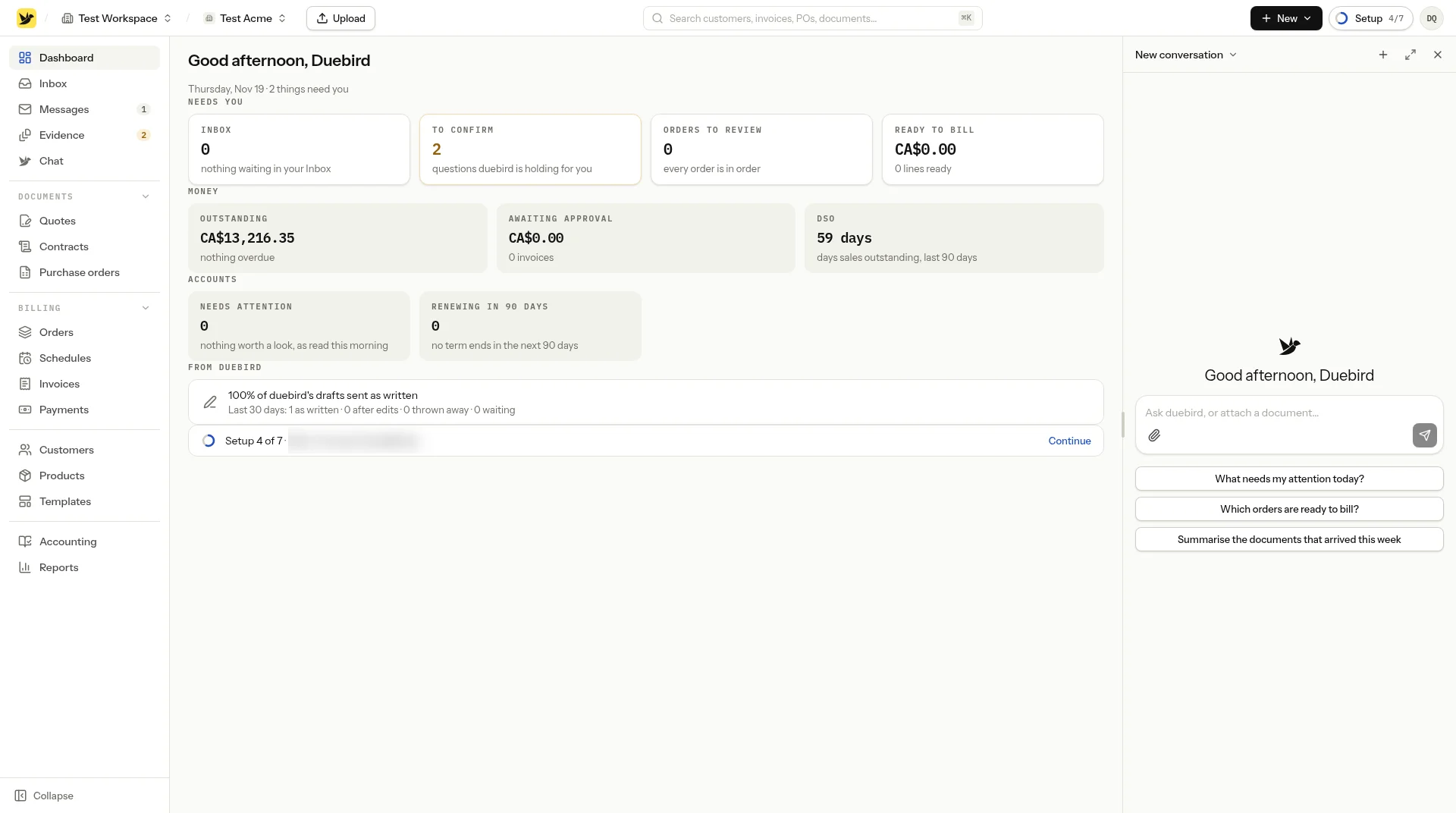
On a record's detail page, the panel is scoped to that record, for example "On: INV-00002".
Use the Chat Page
- Click Chat in the sidebar.
- Conversations lists each conversation with its title, a type tag (CONTRACT, UPLOAD, MAIL or COLLECTIONS), the time and a one-line result.
- Click a conversation to read it. duebird lists each step it took, for example Read the invoice, Searched what duebird remembers, Read the history or Checked where the documents stand, then what it did.
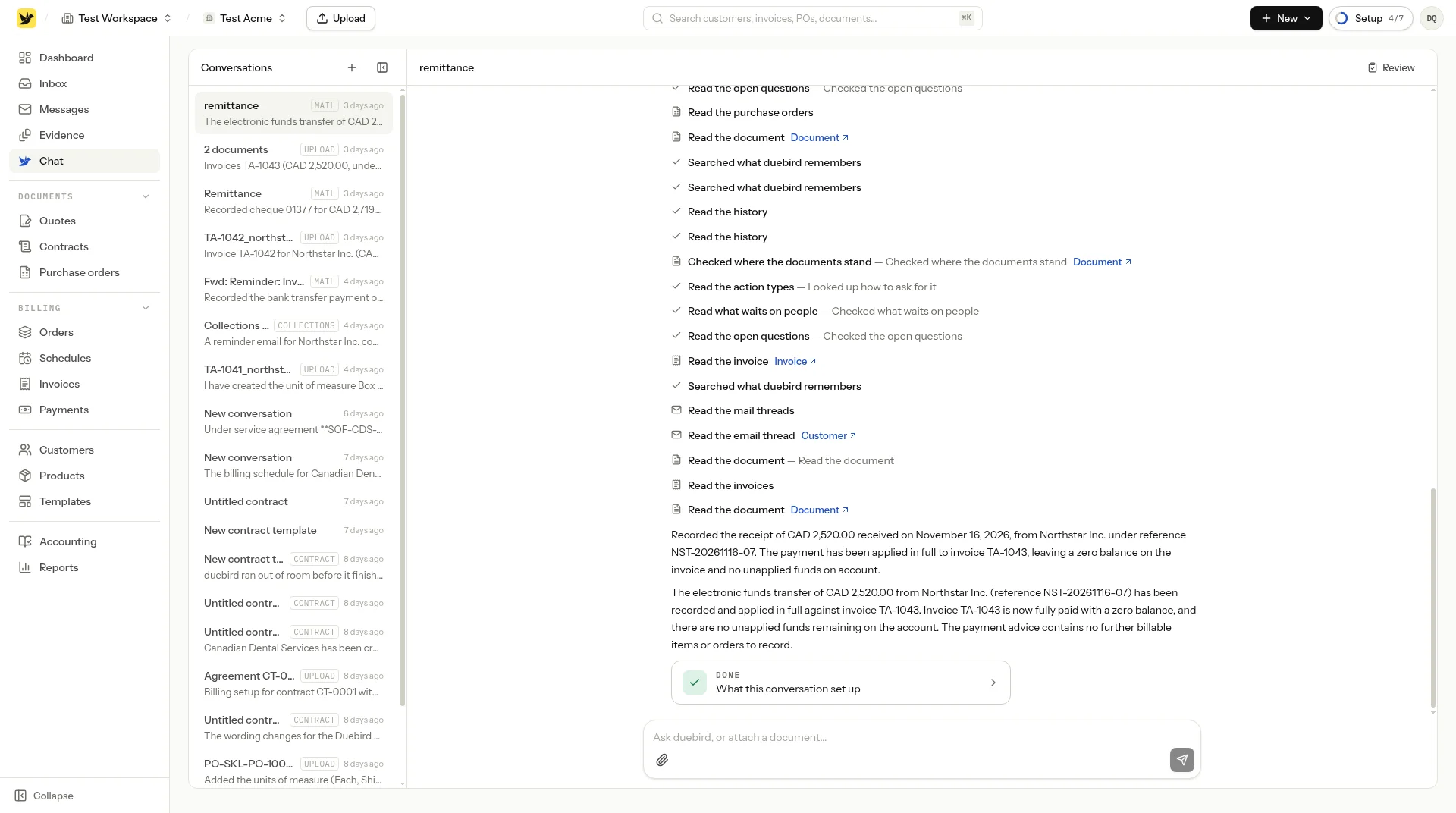
- If a conversation has something for you to confirm, click Review.
Know What to Ask
The suggested prompts are a good start:
- "What needs my attention today?"
- "Which orders are ready to bill?"
- "Summarise the documents that arrived this week"
You can also ask duebird from inside a record. Purchase orders and Evidence have their own Ask duebird option. In the contract and template editors, press space on an empty line to ask duebird ("Write, press space to ask duebird, or type / for blocks").
Tips
- Ask follow-up questions in the same conversation before you save any answers. duebird keeps the thread.
- The type tag tells you where a conversation started: MAIL for email, UPLOAD for an uploaded file.
- Read the result line at the end of a conversation to check what duebird did.
Frequently Asked Questions
Is the assistant panel different from Chat?
No. Both open the same assistant. The panel sits beside the page you are on; Chat gives the full page.
Does duebird only answer questions?
No. It can carry out work from a conversation, such as recording a payment from a remittance. Read the steps and the result before you move on.