
How Duebird Works: From Customer Paperwork to Paid Invoice
How quotes, purchase orders, contracts and other customer documents become orders, invoices and recorded payments in Duebird.
3 min readUpdated
Duebird is a B2B billing and accounts receivable platform. It builds your billing from the paperwork you already receive and write: quotes, purchase orders, contracts, delivery notes and remittances.
duebird, the assistant inside Duebird, reads each document, links it to the right customer and asks about anything it cannot settle. Your team answers its questions, approves invoices and sends them. Every record links back to the document it came from.
How It Works
Duebird connects three paths into one billing record. Documents come in, duebird reads them, and the confirmed results flow into orders, invoices and payments. What you can do depends on your role.
- Documents in: a PO, contract, delivery note or remittance you upload or email. It ends as a document in Evidence, plus questions for you to answer.
- Sales-led: a quote, then the customer's purchase order. It ends as an order, an approved invoice and a recorded payment.
- Contract-led: a contract written and signed in Duebird, or a signed copy you record. It ends as rules, prices and a billing schedule that prepares invoices.
Get Documents In
Use Upload in the top bar, email your duebird address, attach a file in Chat, or drop it on a customer record under ADD EVIDENCE. duebird reads each document "in a conversation of its own" and records it in Evidence with its kind, customer and a one-line summary. Anything it cannot settle becomes a question for a person.
Follow the Sales-Led Path
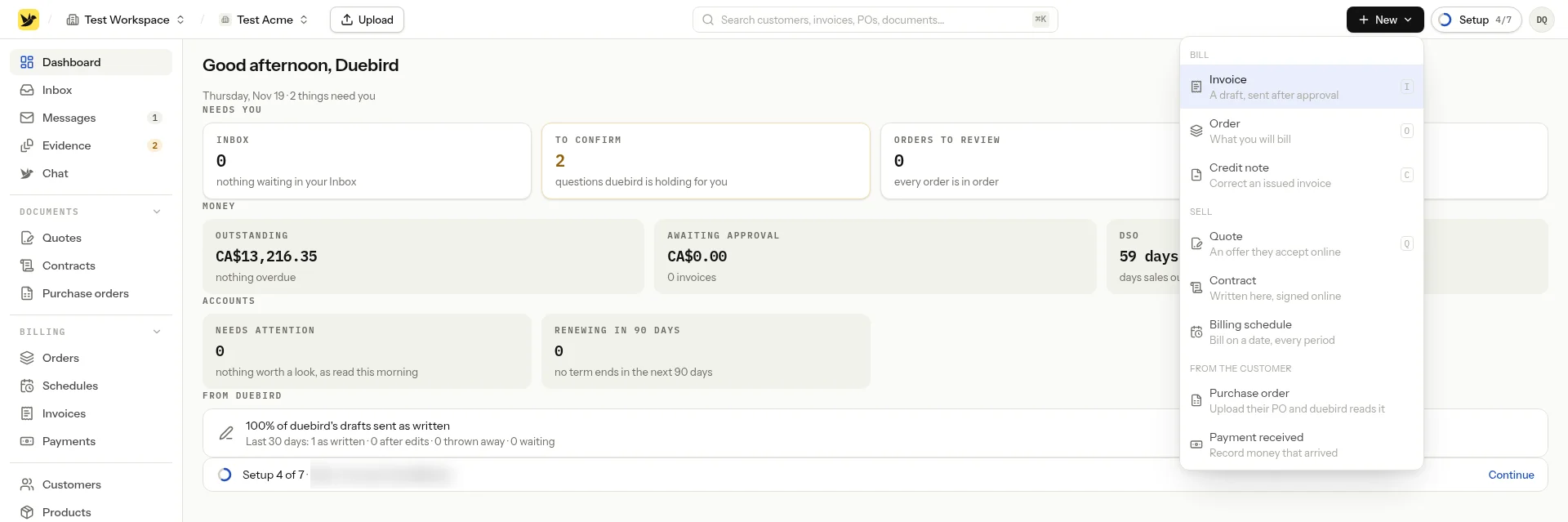
- Quote. Create a quote from + New > Quote ("An offer they accept online"). Prices, tax and addresses come from the customer you choose. The customer gets a link to review the quote and accept or decline it online. Depending on the quote's settings, an accepted quote becomes an order straight away or waits for the customer's PO.
- Purchase order. The customer's PO arrives as a document. duebird reads it into lines. Each PO line needs a product before an order can be made from it.
- Order. Choose + New > Order, then From a purchase order to bring the PO's lines across. Orders track ordered, delivered and invoiced quantities, and lines become Ready to bill.
- Invoice. Bill lines from orders into an invoice. The customer's PO is attached under SENT WITH THE INVOICE. The invoice is approved before it is issued and sent.
- Payment. Record the payment, or let duebird read it from a remittance, and apply it to the invoices it settles.
Follow the Contract-Led Path
- Contract. Write it from a template and send it for e-signature, or record a copy the customer signed elsewhere.
- Rules and prices. Once signed, the contract sets up rules (for example Net 30 and Billed yearly) and customer prices.
- Schedule. Use Create schedule from this contract. A schedule bills "on a date, every period". Invoices are prepared automatically, 7 days ahead, or early with Prepare now.
- Invoice and payment. The orders and invoices a schedule produces go through the same approval and payment steps as any other invoice.
Tips
- Start with the path that matches how your customers buy from you. If customers send POs, begin with uploads and orders. If you bill from agreements, begin with contracts and schedules.
- Check the Dashboard each day. NEEDS YOU shows questions duebird is holding for you, orders to review and lines ready to bill. MONEY shows what is outstanding and what is awaiting approval.
Frequently Asked Questions
Does duebird send invoices on its own?
No. Invoices start as drafts and are approved before they are issued and sent. Reminders are drafted for a person to read and send.
What kinds of documents can duebird read?
The Upload documents dialog names purchase orders, contracts, delivery notes and remittances, "anything" a customer sends you.
How do I see where an invoice line came from?
Open the order (WHERE IT CAME FROM), the invoice (SENT WITH THE INVOICE) or the document in Evidence (WHAT THIS DOCUMENT CHANGED).