
Tour of the Customer Record
Find your way around a customer: the list, the header, and the eight sections of the record.
2 min readUpdated
Every customer has one record that brings together what they owe, what they agreed, who they are and what was said.
The header gives a quick read of the account. Eight sections hold the detail.
How It Works
The Customers list has four tabs: All, Mine, Needs attention and Renewing in 90 days. Search by name or alias, and filter by Status and Account manager.
Needs attention fills up on its own: "An account shows here when duebird reads something worth a look: notice on a renewal, talk of leaving, buying gone quiet, a complaint."
On the record, the header shows the account manager, when they became a customer, their terms and currency, and a health line, for example how long they usually take to pay and when they last wrote.
The sections are:
- Overview: health, what they owe, billing trend, people and how they pay.
- Orders: billing orders, purchase orders and quotes.
- Invoices & payments: balance, aging, open invoices, money on account and reminders.
- Agreements: contracts, billing schedules and renewals.
- Prices: customer prices and billing rules.
- Contacts: their people and yours.
- Details: billing profile, addresses and aliases.
- Notes & documents: search what was said, notes, directives and documents.
Find a Customer
- Click Customers in the sidebar.
- Pick a tab, or search by name or alias.
- Click the customer to open the record.

Start Something for This Customer
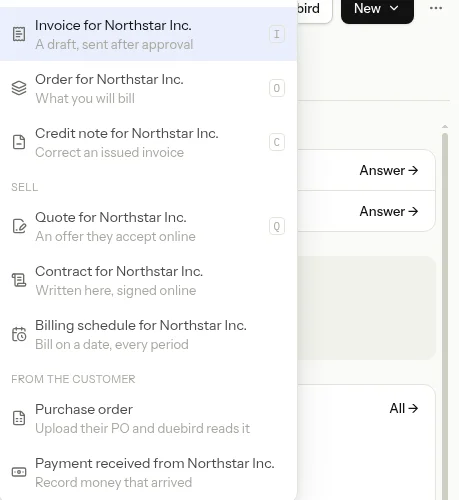
- On the record, click New.
- Choose what to create. Each choice is already set to this customer: an invoice, order, credit note, quote, contract, billing schedule, purchase order or payment received.
Use the More Menu
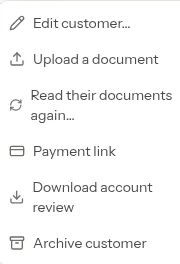
The more menu next to New holds Edit customer..., Upload a document, Read their documents again..., Payment link, Download account review and Archive customer.
Edit customer... changes the name, legal name and currency. Archive customer works only once the customer has no open invoices or orders. It hides the customer and keeps their history.
Tips
- Check Needs attention each week for accounts duebird thinks are worth a look.
- Use Mine to see only the accounts you manage.
- Start new documents from the customer's New menu so the customer is filled in for you.
Frequently Asked Questions
Can I search by a customer's other names?
Yes. The list searches by name or alias.
What puts a customer in Needs attention?
Something duebird read that is worth a look, such as notice on a renewal, talk of leaving, buying gone quiet or a complaint.
Why can I not archive a customer?
They still have open invoices or orders. Close those first.
Where do I ask duebird about one customer?
Click Ask duebird in the customer's header.