
Usage and Milestone Charges on a Schedule
Add usage and milestone charges to a schedule, and mark a milestone reached when it happens.
3 min readUpdated
A schedule can bill more than a fixed fee. Usage charges bill what was recorded at the end of each period. Milestone amounts wait until something happens, such as go-live.
"What does the customer pay for? A recurring fee, a usage rate or a one-off amount: each is one row you can open."
How It Works
Each charge on a schedule is one row:
- Recurring charge: a product, quantity, unit and price per period, billed for example "Monthly on the 1st", either At the start or At the end ("Start: invoiced before the service. End: invoiced after it.").
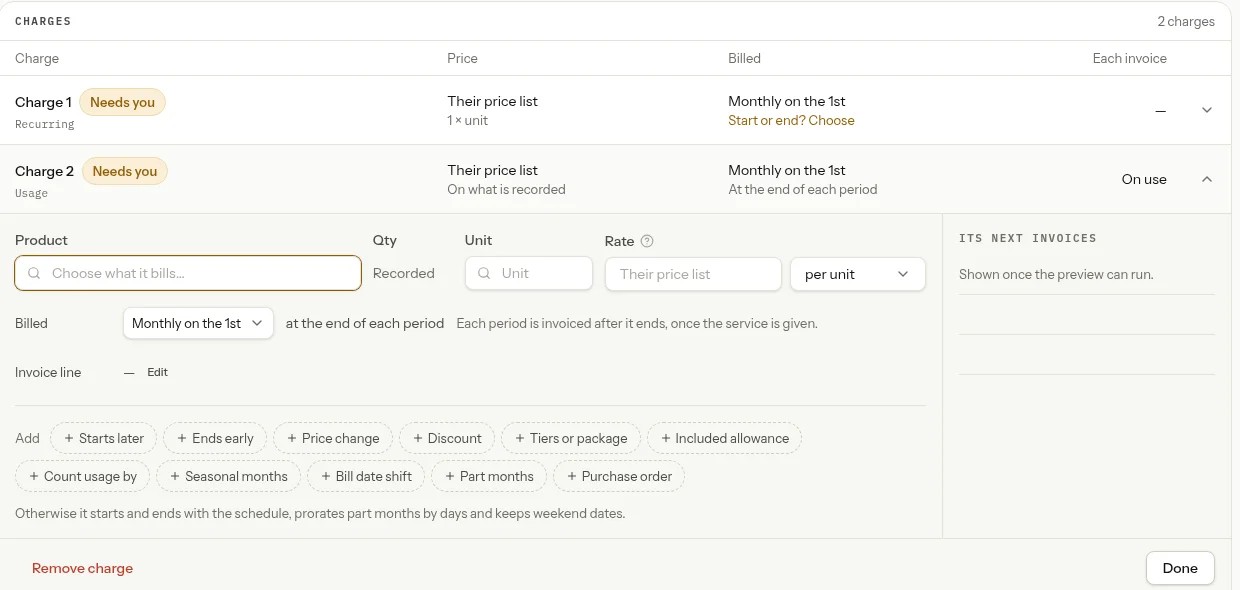
- Usage: a product, the recorded quantity, a unit and a Rate per unit. It is billed at the end of each period: "Each period is invoiced after it ends."
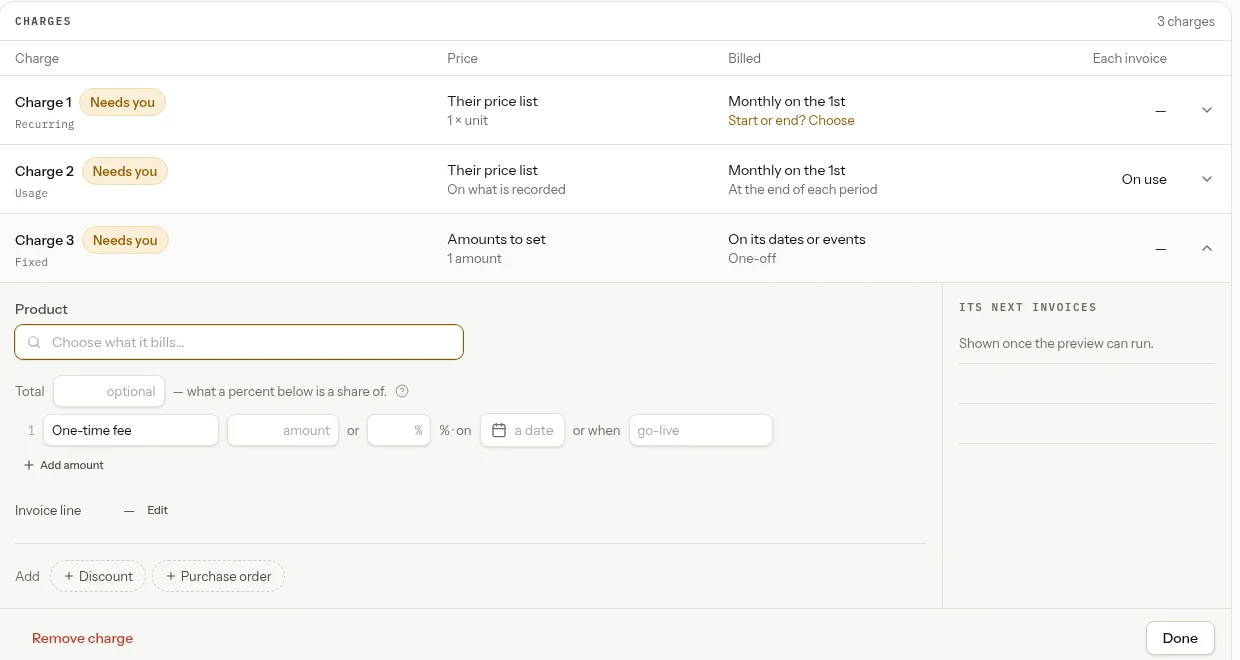
- One-time or milestones: a product, an optional total, and one or more amounts, each due on a date or when an event happens, such as go-live.
Extra options appear as chips under a charge. For example, Included allowance and Count usage by for usage, and Discount or Purchase order for one-time amounts.
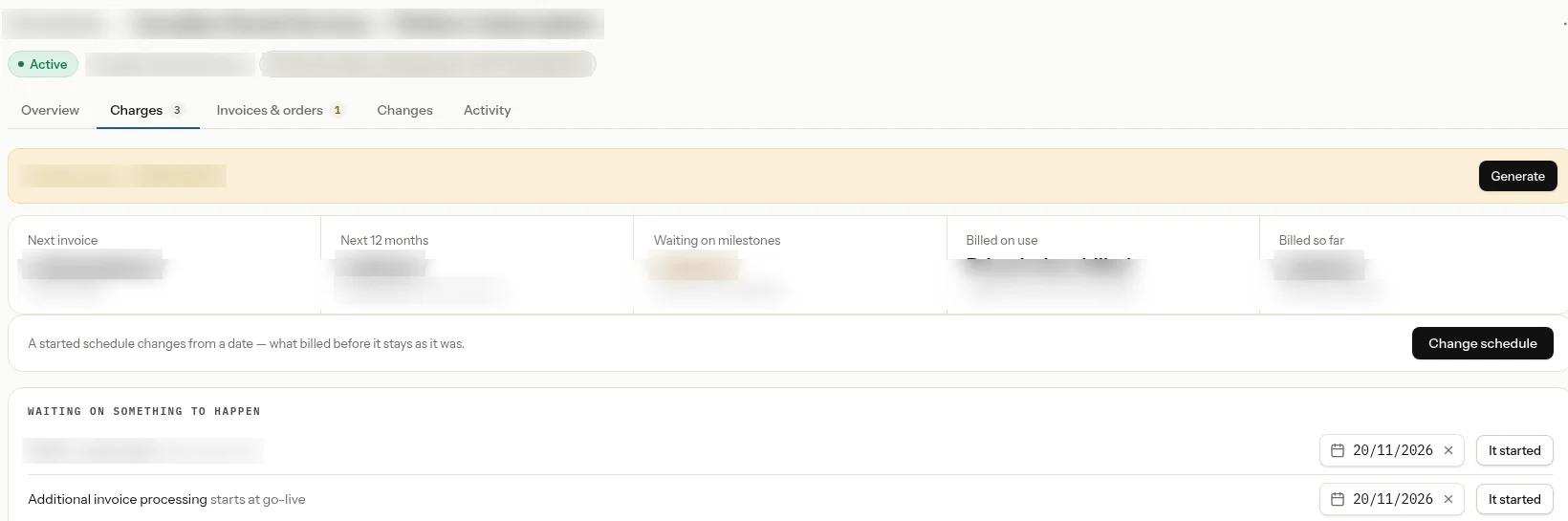
A started schedule's Charges tab shows the totals, the charges, and WAITING ON SOMETHING TO HAPPEN: amounts that wait on an event, each with It started.
Add a Usage Charge
- On a new schedule, or with Change schedule on a started one, click + Usage under CHARGES.
- Choose the Product, the Unit and the Rate per unit.
- Add an Included allowance if the customer has one.
- Click Done.
Add One-Time Amounts or Milestones
- Click + One-time or milestones.
- Choose the Product and, if you like, a Total.
- For each amount, set the label, the amount or percentage, and whether it is due on a date or when something happens, such as go-live. Use + Add amount for more.
- Click Done.
Mark a Milestone Reached
- Open the schedule and click the Charges tab.
- Under WAITING ON SOMETHING TO HAPPEN, find the amount.
- Set the date and click It started.
Amounts tied to a date bill on that date without this step.
Record Usage
Usage bills from what is recorded. Record it as a completion on the order line, and it bills when the period closes. See Record a Delivery or Completed Service.
Tips
- Set an Included allowance so customers only pay for usage above what their plan covers.
- Mark milestones reached on the day they happen, so the amount bills on time.
- Use Change schedule for a started schedule. "What billed before it stays as it was."
Frequently Asked Questions
When is usage billed?
At the end of each period. "Each period is invoiced after it ends."
How do I tell duebird a milestone happened?
Click It started on the schedule's Charges tab.
Can I change charges on a started schedule?
Yes. "A started schedule changes from a date: what billed before it stays as it was."