
Create a Billing Schedule From a Contract
Set up recurring billing from a signed contract, check it, then save it as a draft or start billing.
2 min readUpdated
A billing schedule bills "on a date, every period". Schedules are usually created from a signed contract.
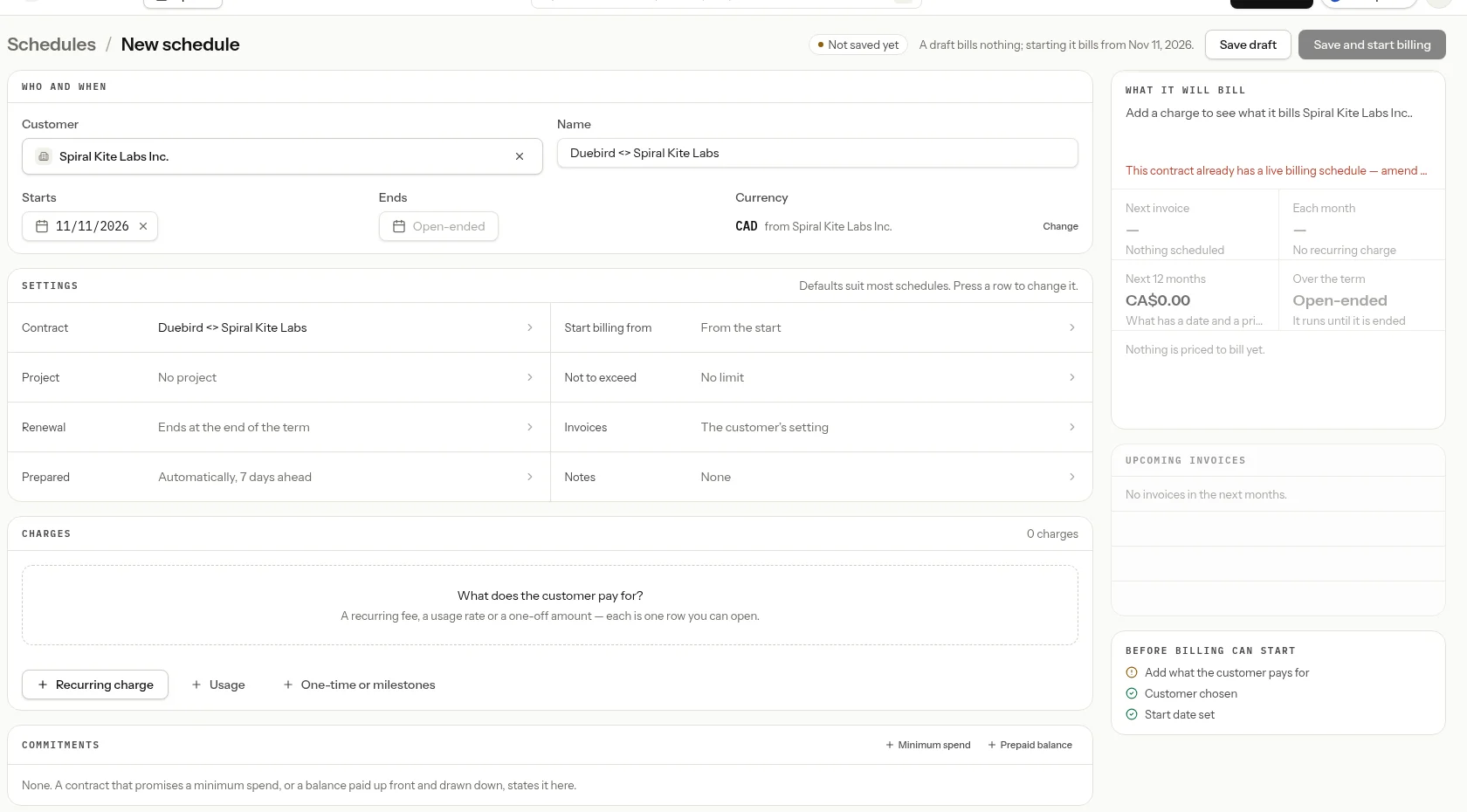
Create schedule from this contract opens a New schedule form filled in from the contract. "A draft bills nothing."
How It Works
A schedule can mix one-time, recurring and usage charges, and a charge can wait on a milestone before it starts.
The Billing schedules list shows Schedule, Customer · contract, Next invoice, Run rate and Billed. Filter by Status (Draft, Active, Paused, Ended) or Customer, or search.

Create the Schedule
- Open the signed contract from Contracts.
- Under SCHEDULES on the Details tab, click Create schedule from this contract.
- The New schedule form opens, marked "Not saved yet". If the contract already has a live billing schedule, the form warns you and suggests you amend that one instead.
Fill In the Form
- Under WHO AND WHEN, check the Customer, Name, Starts, Ends and Currency.
- Under SETTINGS, check Contract, Project, Renewal, Prepared, Start billing from, Not to exceed, Invoices and Notes. "Defaults suit most schedules. Press a row to change it."
- Under CHARGES, add what the customer pays for: Recurring charge, Usage, or One-time or milestones.
- Under COMMITMENTS, add a Minimum spend or Prepaid balance if the contract promises one.
- Check WHAT IT WILL BILL, UPCOMING INVOICES and BEFORE BILLING CAN START, which lists what is still missing.
Save or Start Billing
- Save draft keeps the schedule as a draft. "A draft bills nothing."
- Save and start billing saves it and starts billing from the start date.
Tips
- Read BEFORE BILLING CAN START first. It lists what the schedule still needs.
- Keep one live schedule per contract. If one exists, amend it rather than making another.
- Check Prepared in SETTINGS so invoices are ready before they are due.
Frequently Asked Questions
Does creating a schedule start billing?
Only if you click Save and start billing. A draft bills nothing.
What if the contract already has a schedule?
The form warns you that the contract already has a live billing schedule and suggests you amend that one.
Can a schedule have more than one kind of charge?
Yes. One schedule can mix one-time, recurring and usage charges.