
Set Up an Email Agent
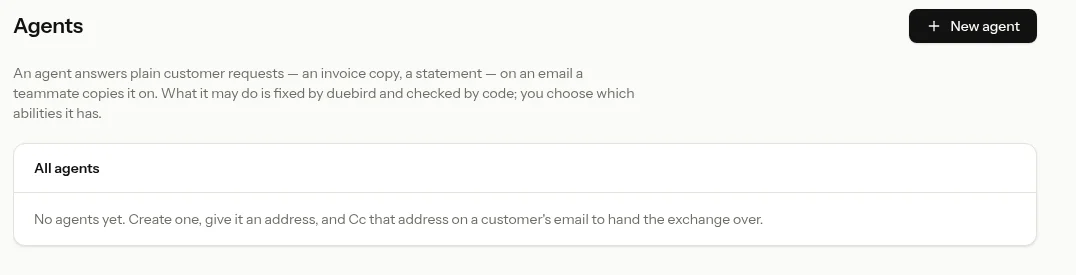
Create an agent that answers plain customer requests, such as an invoice copy or a statement.
1 min readUpdated
"An agent answers plain customer requests (an invoice copy, a statement) on an email a teammate copies it on."
"What it may do is fixed by duebird and checked by code."
How It Works
Each agent has its own email address. To hand an exchange over, Cc that address on a customer's email.
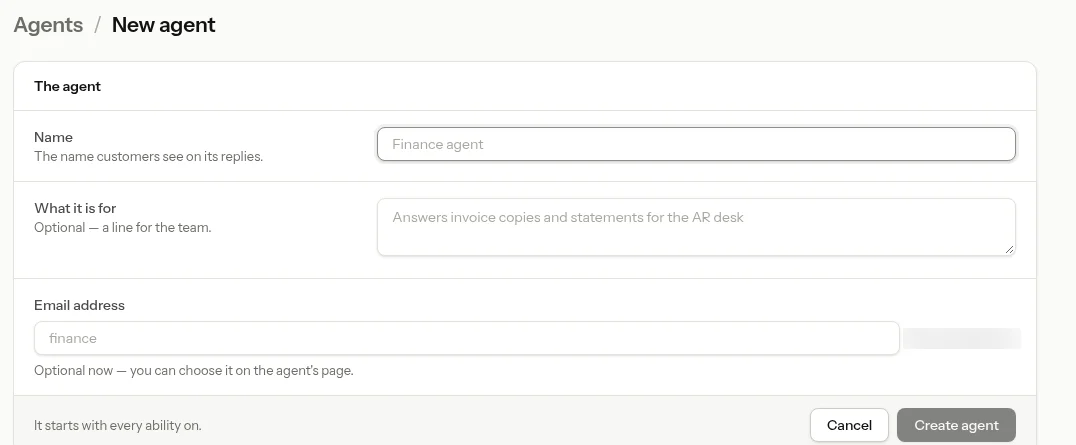
The New agent form asks for:
- Name: "The name customers see on its replies."
- What it is for: "Optional: a line for the team."
- Email address: "Optional now: you can choose it on the agent's page."
"It starts with every ability on."
Create an Agent
- Open your organization's settings and click Agents.
- Click + New agent.
- Enter a Name and, if useful, What it is for.
- Choose an Email address, or set it later on the agent's page.
- Click Create agent.
Hand an Email to the Agent
- Reply to the customer's email as usual.
- Cc the agent's address. The agent takes over the exchange.
Tips
- Give the agent a name customers will recognise, such as your AR team's name.
- Use What it is for to tell your team what the agent handles.
- Give each agent one clear purpose, such as invoice copies.
Frequently Asked Questions
What can an agent do?
Answer plain customer requests, such as an invoice copy or a statement. Its abilities are fixed by duebird and checked by code.
How do I give an agent a conversation?
Cc its address on the customer's email.
Does a new agent start with limited abilities?
No. It starts with every ability on.