
Numbering for Orders, Invoices, Credit Notes and Quotes
Set how each kind of document is numbered, and the next number it claims.
1 min readUpdated
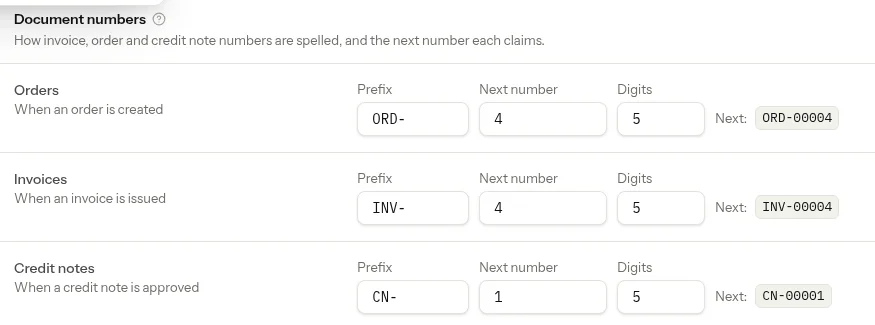
Document numbers in Settings > General sets "How invoice, order and credit note numbers are spelled, and the next number each claims."
"A number is never handed out twice, so the next number can only go up."
How It Works
Each kind of document has its own sequence, with a Prefix, a Next number and Digits, the number of places it is padded to. A preview shows the next number, for example prefix INV-, next number 42 and 5 digits gives INV-00042.
Documents are numbered at different moments:
- Orders: when an order is created.
- Invoices: when an invoice is issued. "A draft has no number yet."
- Credit notes: when a credit note is approved.
- Quotes: when a quote is first sent. Revisions keep the number.
A voided invoice keeps its number. Numbers are never reused.
Set Your Numbering
- Open your organization's settings and click General.
- Scroll to Document numbers.
- For each kind of document, set the Prefix, Next number and Digits.
- Check the preview next to each row.
Tips
- Set numbering before you issue your first invoice.
- Continue from your previous system's last number so your customers see no gaps.
- Use a different prefix in each organization so documents are easy to tell apart.
Frequently Asked Questions
Can I lower the next number?
No. It can only go up.
Why does my draft invoice have no number?
Invoices are numbered when they are issued.
When does a credit note get its number?
When it is approved.