
How duebird Reads Remittances
Remittance advice sent by email or uploaded is read by duebird and turned into recorded payments.
2 min readUpdated
When a customer sends remittance advice, duebird reads it and records the payment against the invoices it names.
When duebird is unsure, it does not guess. It asks you, and records the payment as soon as you answer.
How It Works
Each organization has its own duebird address for incoming documents. Customers keep writing to your AR mailbox, which forwards to duebird, or you can upload a remittance yourself.
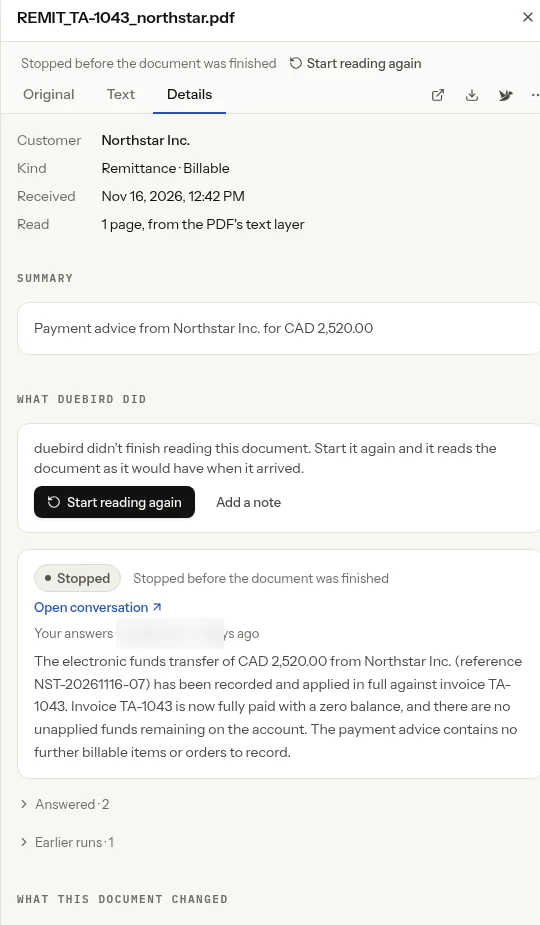
Remittances appear in Evidence. Open one to see its Customer, Kind (for example "Remittance · Billable"), a SUMMARY, WHAT DUEBIRD DID, and WHAT THIS DOCUMENT CHANGED.
The recorded payment appears on the Payments list. Its detail page shows the invoice under WHERE THIS MONEY HAS GONE, marked "They named this invoice".
A remittance duebird is unsure about becomes a question. It appears in your review queue, on the document, and as a banner on the customer's Overview: "duebird has a question about" the file, with Answer.
Check What duebird Did With a Remittance
- Click Evidence in the sidebar and open the remittance.
- Read SUMMARY and WHAT DUEBIRD DID.
- Check WHAT THIS DOCUMENT CHANGED to see the payment it recorded.
Answer a Question About a Remittance
- Open the customer. The question shows at the top of Overview.
- Click Answer and respond. duebird records and applies the payment straight away.
Find Payments duebird Recorded
- Click Payments in the sidebar.
- Find the payment by its reference, customer or amount, and open it.

Tips
- Have your AR mailbox forward to duebird, so remittances arrive without anyone forwarding them by hand.
- Upload a remittance that reached you some other way.
- Answer remittance questions quickly so the customer's balance stays right.
Frequently Asked Questions
How do remittances reach duebird?
By email forwarding to your organization's duebird address, or by upload.
What if a remittance is unclear?
duebird asks you. Your answer records and applies the payment.
How do I know which invoice a payment went to?
Open the payment. WHERE THIS MONEY HAS GONE lists each invoice and the amount.