Is the customer late, or is the invoice wrong?
The invoice says Net 15. The contract says Net 45. Check which terms apply before the next reminder calls the customer late.
By the Duebird team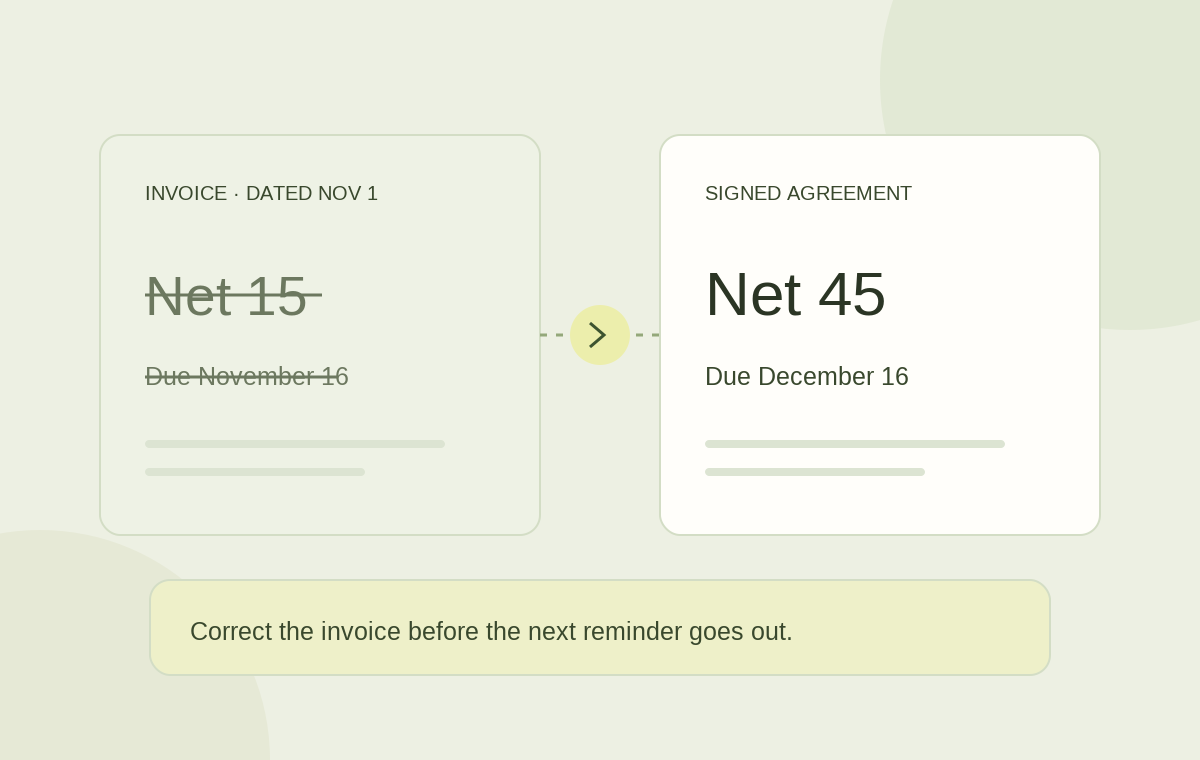
Check the payment terms in the signed agreement, and the event that starts the clock, before calling an invoice late. If the invoice states different terms, correct it and confirm the due date with the buyer.
Before calling an invoice overdue, check the agreed payment terms and what starts the clock. A billing-system default can put Net 15 on an invoice even when the customer agreed to Net 45. Correct the mismatch, confirm the due date with the buyer, and update the follow-up plan.
The invoice is not the agreement. When the two disagree, a reminder built from the invoice asks the customer to pay a debt that is not yet due. Their AP team will check the contract, and the conversation starts from an error.
Find the event that starts the payment clock
Net 45 says how many days the customer has. It does not say when counting begins. Agreements start the period from different events: the invoice date, receipt of a valid invoice, the service start date, or the customer’s acceptance of the work.
Read the payment clause in the signed agreement and your billing policy together. No single rule decides it for all agreements, so take the start event from the documents rather than from a system default.
Work through Net 15 against Net 45
In this example, an invoice dated November 1, 2026 says Net 15. The signed agreement gives the customer 45 days from the invoice date. The two terms produce different due dates.
| Source | Terms | Due date |
|---|---|---|
| Invoice as sent | Net 15 from invoice date | November 16, 2026 |
| Signed agreement | Net 45 from invoice date | December 16, 2026 |
| Reminder planned | Sent November 20 | Before the agreed due date |
Before the next invoice goes out, review invoice payment-term settings so a default does not replace the customer’s agreed terms.
Fix the invoice and the next message
A November 20 reminder must not say the invoice is overdue. Under the agreement, the customer still has almost four weeks. Correct the record before anyone writes to them.
- Confirm the payment terms and start event in the signed agreement.
- Correct the invoice, or issue the appropriate correction under your company’s process.
- Tell the buyer the corrected due date in plain words.
- Update the reminder schedule and the person responsible for the next follow-up.
To stop it happening again, prepare billing from the signed contract so its payment terms set the customer’s billing rules.
Use wording the receiving AP team can verify
State the terms, the start event, and the agreement they come from. Where the clock starts on the invoice date, the due date can be printed: “Payment terms: Net 45 from invoice date, per the Master Services Agreement dated October 3, 2026. Due date: December 16, 2026.”
Where the agreement starts the clock on receipt of a valid invoice or on acceptance, name the event instead of a date you cannot know: “Payment terms: Net 45 from receipt of a valid invoice, per section 4.2 of the agreement.” Include the PO number or supporting evidence the buyer requires.
For the receiving side, see why invoice approval gets delayed when an invoice and its agreement do not match.
Keep the agreed terms with the customer account
Duebird brings the payment terms from a signed contract into the customer’s billing rules, and each invoice takes its due date from them. Finance can see the agreed terms beside the invoice before a reminder is prepared.
The buyer still controls its own approval. Accurate terms remove an avoidable dispute; they do not guarantee that payment arrives early.
Check the agreed terms and the event that starts the clock before calling an invoice late. Correct the invoice first, then the reminder.