
Units of Measure and Pack Sizes
Set the units you bill in, and how quantities in one unit bill in another.
2 min readUpdated
Units of measure lists every unit you bill in, with a code, name, category and precision.
Pack sizes on a product convert one unit to another. "duebird never guesses a conversion."
How It Works
The Units of measure tab on Products shows CODE, NAME, CATEGORY and PRECISION.
A unit has:
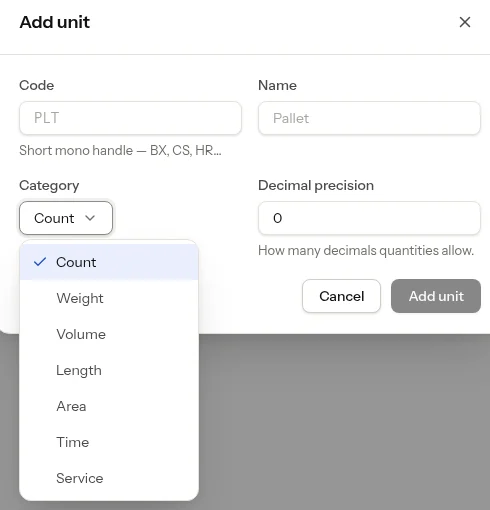
- Code: a short handle, such as BX, CS or HR.
- Name: what it is called, such as Box.
- Category: Count, Weight, Volume, Length, Area, Time or Service.
- Decimal precision: how many decimals quantities allow.
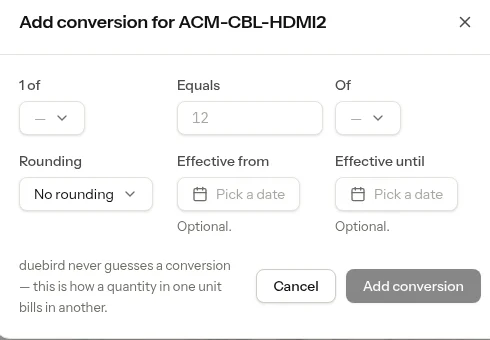
A pack size says that 1 of one unit equals a number of another, for example 1 case equals 12 each. It is "how a quantity in one unit bills in another." With none set, "a delivery in another unit asks before it bills."
How a customer writes units is kept as an alias on the customer. See Product and Unit Aliases.
Add a Unit
- Click Products in the sidebar, then the Units of measure tab.
- Click + Add unit.
- Enter the Code and Name, choose the Category and set the Decimal precision.
- Click Add unit.
Add a Pack Size
- Open the product.
- Under PRICE AND UNITS, click + Add pack size.
- Set 1 of a unit, Equals a number, Of another unit.
- Choose Rounding, and Effective from and Effective until if the conversion only applies for a time.
- Click Add conversion.
Tips
- Add pack sizes for products customers order by the box or case.
- Set decimal precision to 0 for units that only come whole.
- If deliveries keep raising unit questions, add the pack size once.
Frequently Asked Questions
What happens if a delivery comes in a different unit?
With no pack size set, duebird asks before it bills.
Does duebird guess conversions?
No. It only uses the pack sizes you set.
Where do a customer's own unit names go?
In their aliases, on the customer's Details.