
Hold Reminders for a Customer
Pause reminder drafts for one customer while someone is already talking to them.
1 min readUpdated
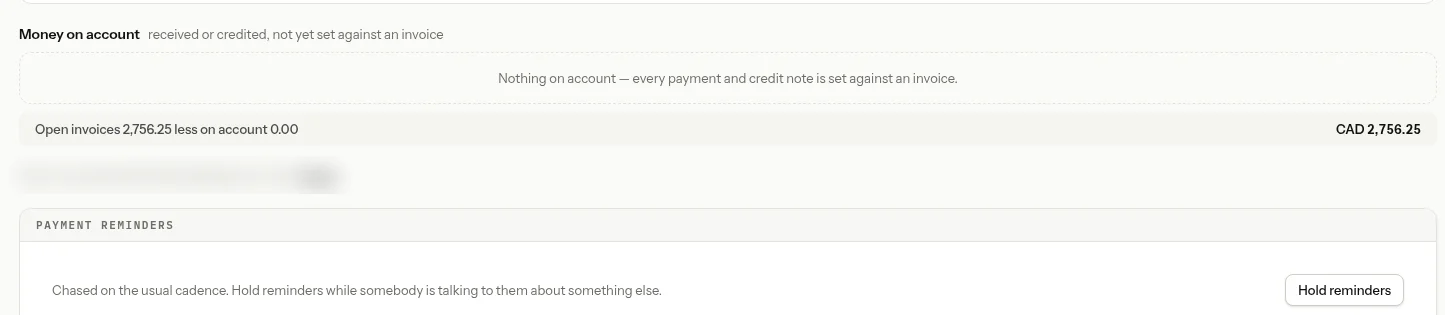
Customers are "Chased on the usual cadence" by default.
Hold reminders pauses chasing for one customer "while somebody is talking to them about something else."
How It Works
PAYMENT REMINDERS is on the customer's Invoices & payments page, with Hold reminders.
While reminders are held, duebird does not draft reminders for the customer. You can still use Follow up on an invoice. Its draft comes with the hold reason flagged for review.
To start chasing again, release the hold from the same place, or clear whatever caused it.
Hold Reminders
- Open the customer and click Invoices & payments.
- Scroll to PAYMENT REMINDERS.
- Click Hold reminders.
Release the Hold
- Return to PAYMENT REMINDERS on the customer.
- Release the hold. The customer is chased on the usual cadence again.
Tips
- Add a note on the customer saying why reminders are held.
- Release the hold as soon as the other conversation ends.
- Use Follow up for a one-off chase while a hold is on.
Frequently Asked Questions
Does holding reminders affect other customers?
No. It applies to this customer only.
Can I still chase one invoice while reminders are held?
Yes. Use Follow up. The draft flags the hold for you to review.
Where do I see whether a customer is being chased?
Under PAYMENT REMINDERS on their Invoices & payments page.